 Top 3 Priorities
Built for focused teams
Three things. Everyone. Always visible.
Top 3 Priorities is the lightest possible way to keep a whole company aligned. Every person keeps their three most important priorities on one simple page — no accounts, no passwords, no app to install — and leadership sees the entire company on a single live dashboard.
Team member looking for your page? Use the private link your administrator sent you — no login needed.
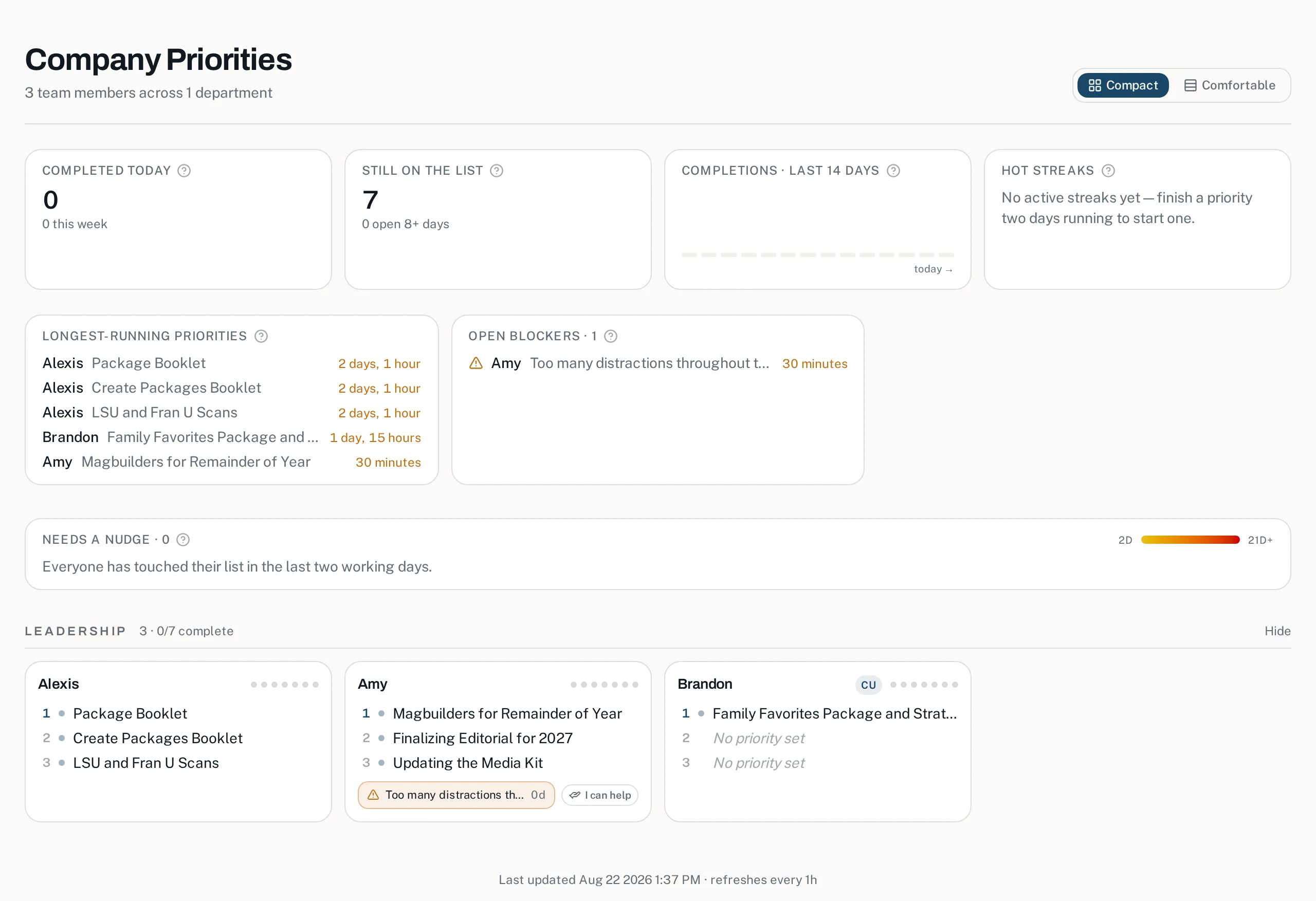
The real company dashboard — live, unfiltered, always current.
0
accounts or passwords for your team
60 sec
to update all three priorities
1
live dashboard for the whole company
How it works
Live for your whole team in about 15 minutes
Worried rollout will eat your week? It won't. One admin signs in, adds names, and clicks send — every invite includes the how-to guide, so your team is setting their Top 3 before lunch. No accounts, no passwords, no training sessions.
1. Add your team
An admin adds names (or they appear automatically via SSO). No invitations, no passwords, no onboarding sessions.
2. Share private links
Each person gets a unique edit link — by email or a quick copy-paste. Opening it is the entire training program.
3. Watch alignment happen
Priorities, blockers, streaks, and nudges flow onto live dashboards that refresh themselves all day long.
Every screen you'll touch, in order, with the real time each step takes.
For every team member
A personal page so simple nobody needs training
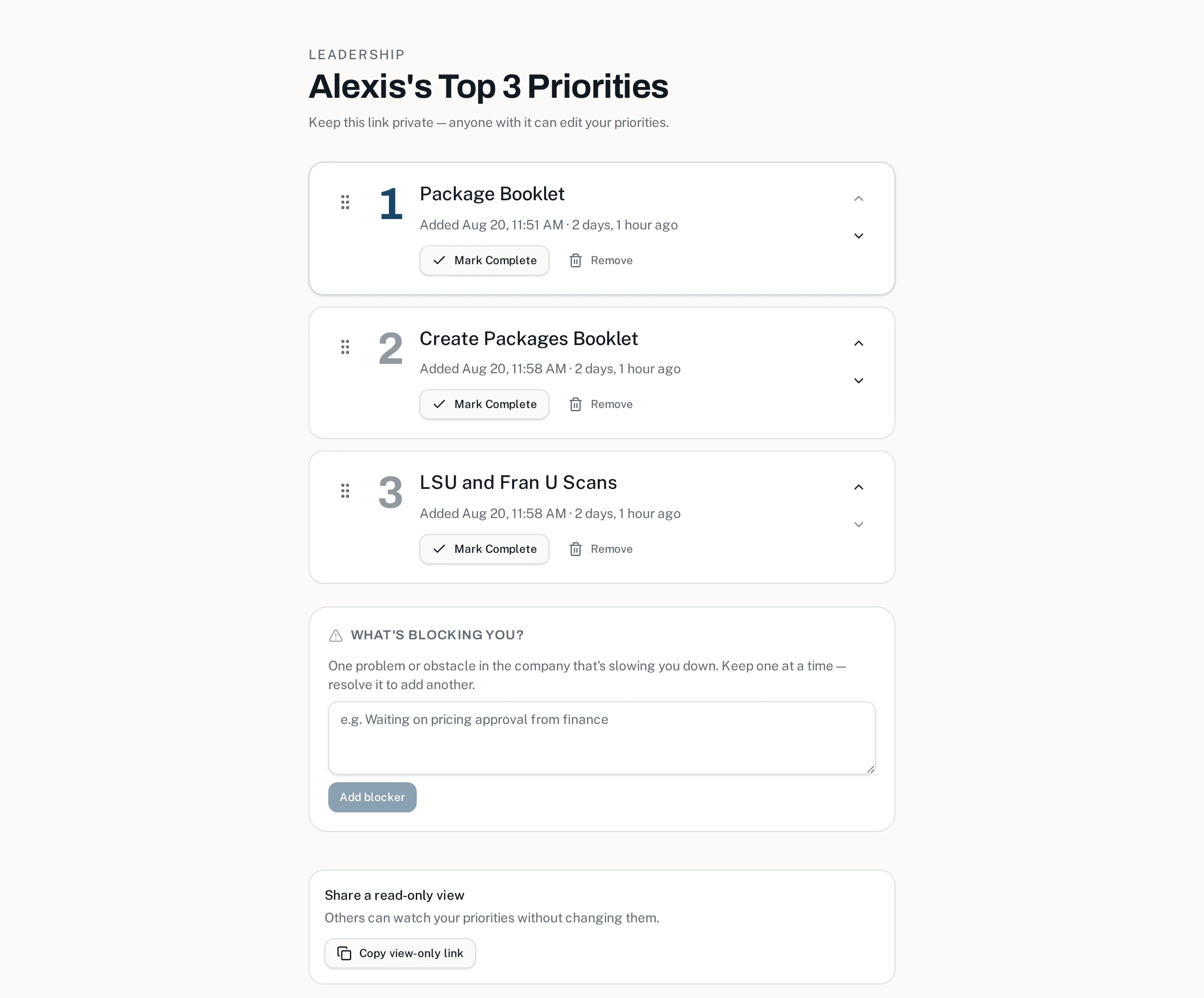
Each person gets a private link to their own page: three numbered priorities they can add, edit, reorder, and check off — plus one blocker they can flag. That's the whole interface. If you can send a text message, you can keep your priorities current.
- Private 256-bit token links — no usernames, passwords, or apps
- Exactly three slots, so the list stays a priority list, not a backlog
- Drag to reorder; mark complete; replace what's done with what's next
- One open blocker at a time keeps obstacles honest and visible
- A read-only view link lets anyone follow along without editing
For leadership
The whole company on one living dashboard
Stop asking for status updates. The company dashboard shows every person's three priorities the moment they change — with completion stats, a 14-day trend, the longest-running items, open blockers, hot streaks, and a nudge radar for anyone who's gone quiet.
- Auto-refreshes on an interval you choose — put it on a TV
- Compact and comfortable densities scale from 5 to 50+ people
- Every widget has a built-in explainer tooltip — no guesswork
- Departments can collapse, and every number is live, not exported
- ClickUp-synced members are badged so you know what's automated
For the hallway, not just the desk
A mobile board built for phones
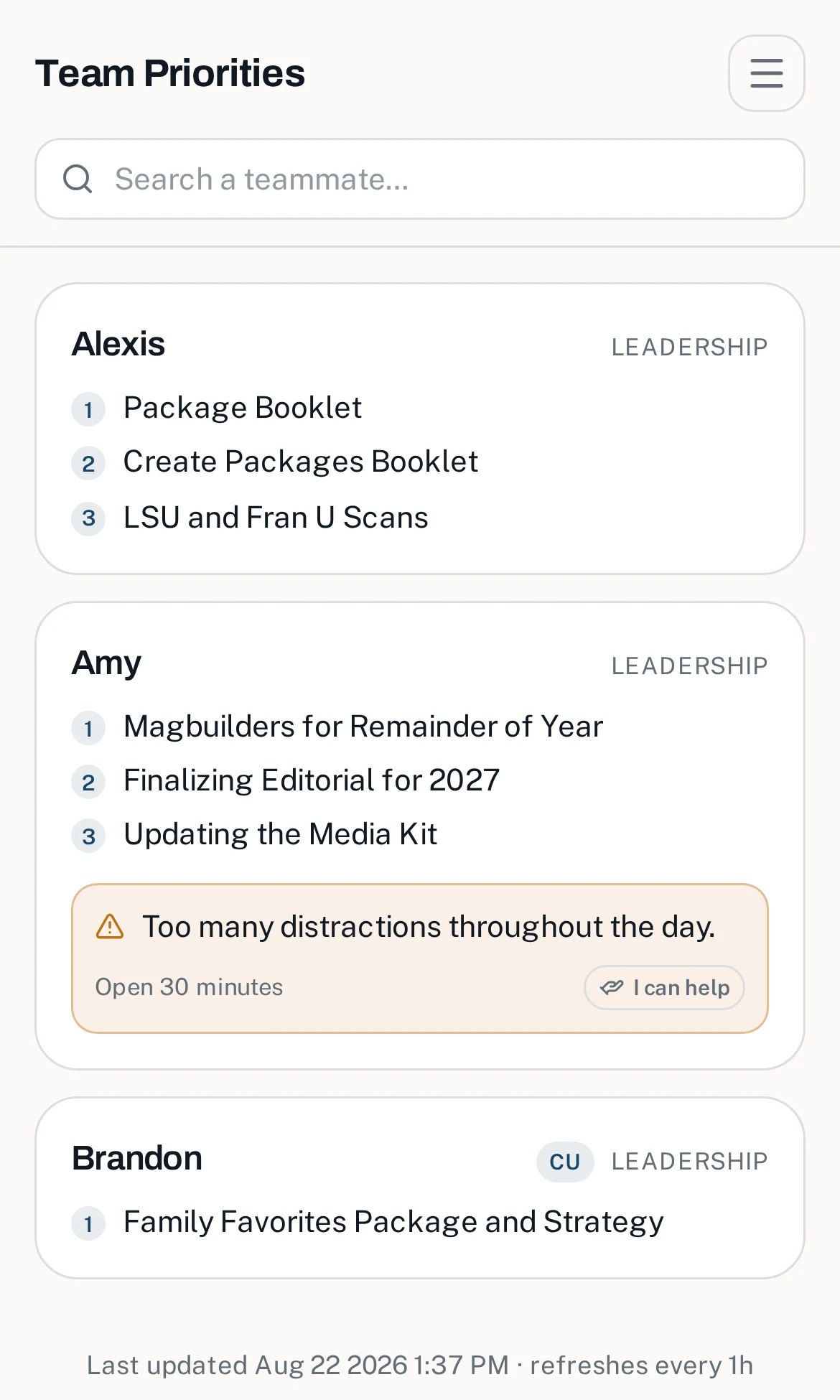
The mobile board is a phone-first view of the whole team: a sticky search bar, a per-device people picker so everyone curates their own list, and one-tap help offers on blockers. Add it to your home screen and the company is in your pocket.
- Search any teammate instantly
- Choose whose cards you see — saved per device, no account needed
- Blockers show their age and who has offered to help
- Same private link model: bookmark it once, done
For administrators
Total control, five minutes a month
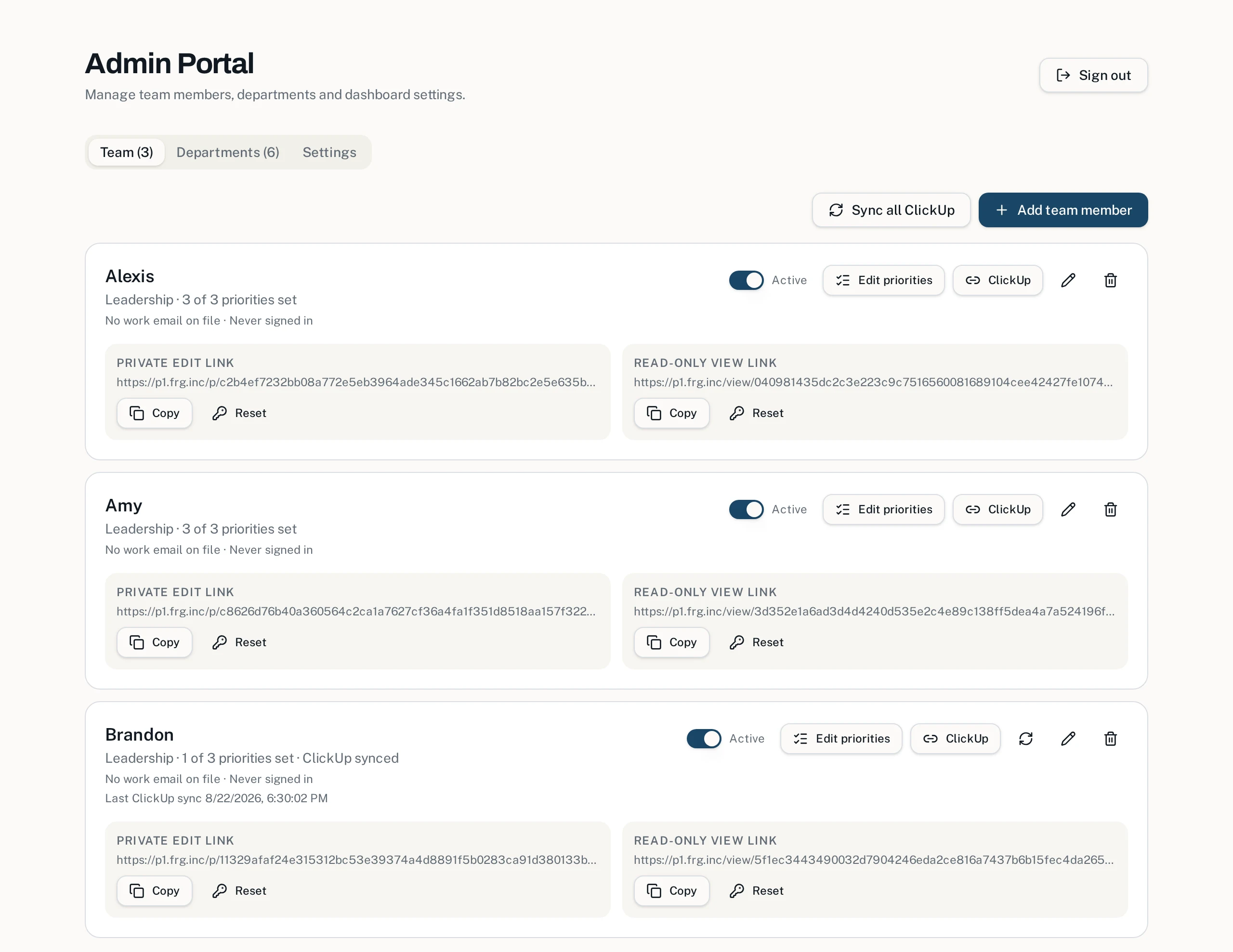
The admin portal manages people, departments, links, and settings in one place. Add a hire and their links are ready; edit anyone's priorities or blocker directly; reset a leaked link in one click; connect ClickUp or SSO when you're ready.
- Add, edit, deactivate, or remove team members in seconds
- Copy, reset, or email private edit and read-only links per person
- Edit any member's priorities or blocker without leaving the portal
- Per-department dashboard links for managers
- Company logo branding on every page your team touches
Built-in AI coach
Turn a vague to-do into a priority you can actually finish
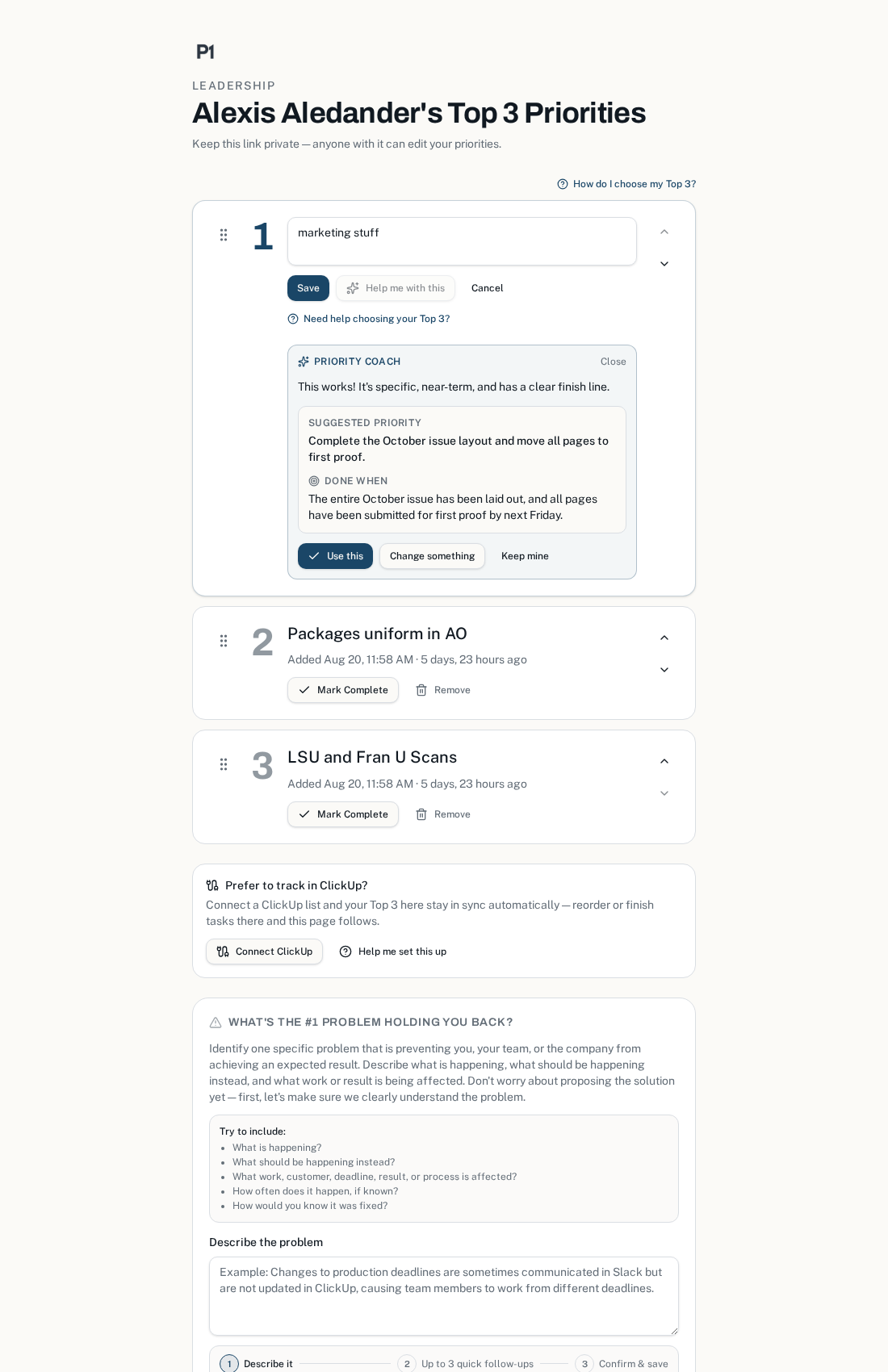
Most priority lists fill up with fuzzy intentions like "work on marketing." Top 3 Priorities includes an AI Priority Coach that works with each employee right inside the priority field — asking a couple of quick questions until the task has a specific finish line. The result lands in the Top 3 already sharp enough to act on, so leadership sees real commitments instead of wishful thinking.
- One private button — "Help me with this" — opens the coach right under the priority field
- A visual step indicator shows exactly how many follow-ups are left, so no one bails early
- AI proposes a sharper priority plus a "Done when" finish line the employee can accept or tweak
- The finish line travels with the priority onto dashboards and read-only views
Built-in AI coach
Problems come out clear — not just loud
Most tools collect complaints. Top 3 Priorities includes an AI Problem Coach that privately works with each employee the moment they flag a blocker — guiding them from a vague frustration to a specific, actionable problem your business can assign, work on, and later mark as solved. Your staff gets help articulating what's holding them back. You get signal instead of noise.
- Coaches employees one-on-one to sharpen a rough complaint into a concrete, fixable problem
- Only clear, approved problem statements ever reach your dashboards — no venting, no noise
- Solved problems get marked as solved, so resolution becomes visible over time
- Nothing to install or learn — the coach lives right inside the blocker form
"Everything is just chaos right now."
Let's narrow that down — which one thing, if fixed this week, would unblock the most of your work?
Approved problem
"Weekly reports take 3 days because the same numbers are re-typed by hand into two systems."
An illustrative exchange — the coach does the refining, your dashboards stay clean.
And there's more
Small app. Serious follow-through.
Hot streaks
Consecutive working days with a completed priority build a streak. Weekends don't break it. A little friendly fire keeps momentum visible.
One blocker each
Everyone can flag the single obstacle slowing them down. Blockers surface on every dashboard with their age, so nothing festers quietly.
"I can help" button
Anyone viewing a blocker can offer help with one tap. The owner sees exactly who raised a hand — and offers reset if the blocker changes.
Needs-a-nudge radar
A weather-radar gradient (yellow to red) shows who hasn't touched their list, so managers can encourage — not interrogate.
ClickUp sync
Members already living in ClickUp can sync the top 3 tasks from any list view automatically, on a schedule or on demand. A CU badge marks them.
Department dashboards
Every department gets its own private dashboard link, so managers see just their team while leadership keeps the company-wide view.
SSO & auto-provisioning
Admins sign in with company SSO (SAML, e.g. Rippling). New hires are provisioned on first sign-in; inactive accounts deactivate automatically.
Link recovery by email
Lost your link? Team members enter their work email on the sign-in page and get their private edit and view links resent instantly.
Why it works when bigger tools don't
Project tools fail at alignment because they ask too much: log in, learn the system, keep it updated. Top 3 Priorities asks for almost nothing — open a link, type three things, tap complete. Because the cost of participating is nearly zero, participation is nearly total. And because the dashboard is always live, visibility stops depending on meetings.
Radical constraint: three priorities forces real choices.
Zero friction: no logins means no excuses.
Gentle accountability: streaks and nudges, not surveillance.
Help over blame: blockers come with an "I can help" button.
Three priorities. That's the whole ask.
Administrators can sign in to manage the team. Team members — your private link is your key; ask your admin or use the email recovery on the sign-in page.
Try it with your team
Think this could help your company?
If you'd like to give Top 3 Priorities a try in your organization, send a message below — tell us a little about your team and what you're hoping to improve, and we'll be in touch.
- A short note is enough — no lengthy forms
- You'll get an instant email confirmation that it landed
- Every message gets a personal reply